Thursday, March 11, 2010

Installing a SQL Server 2008 named instance – Windows Server 2008 R2

Run the setup from your SQL Server 2008 CD

clip_image002

clip_image004

Click Installation tab and click New SQL Server Stand Alone installation or add features to an existing installation.

clip_image006

clip_image008

clip_image010

clip_image012

clip_image014

clip_image016

Accept the licensing terms.

clip_image020

clip_image022

Give a name to the SQL Server instance.

clip_image024

clip_image026

clip_image028

i am not going to install this particular instance in mixed mode hence i have selected the windows authentication mode. Setup wont allow you to go to next step unless if you didn't specify a administrator account. I have added the current user credential as one of the administrator account for the SQL Server.

clip_image032

clip_image036

clip_image038

clip_image040

clip_image042

clip_image044

clip_image046

clip_image048

clip_image050

http://support.microsoft.com/kb/955499

http://support.microsoft.com/kb/956173

Wednesday, March 10, 2010

Uninstalling SQL Server 2008 Instance

please follow the steps mentioned below to uninstall a named instance of a SQL Server 2008. For the reference of others I have published the screen shots to help you guys in some way. Please make sure before uninstalling that none of the SQL services are not used by other applications.

Go to the control panel => Programs => Programs and Features

clip_image002

Browse to SQL Server 2008 and click the Uninstall/Change button above.

clip_image004

Click continue when a prompts comes and make sure that no one is logged into the server.

Click Remove and please follow the screen shots as mentioned below.

clip_image006

clip_image008

clip_image010

Select the SQL Server 2008 instance to uninstall.

clip_image012

Select the features belonging to the instance that you are going to uninstall and keep the shared features.

clip_image014

clip_image016

clip_image018

clip_image020

clip_image022

At the time of uninstallation process I had problem with uninstalling the reporting services and the error was:

"An error has occurred: Access to the path '<Path of perf-ReportServer-rsctr.dll>' is denied"

Please refer this link to resolve the error:

To resolve this issue, close or stop any process or application that may be using the Report Server performance counter, and then try to uninstall Report Server.

http://support.microsoft.com/kb/956173

Wednesday, March 03, 2010

VS 2008 SP1 ISO image

when we are installing VS 2008 SP1, initially we can download a .exe from the microsoft site and upon executing that file we should have the internet connection as it fetches all the latest patches online.

if we need to apply the same SP1 to multiple machines then it will be really a headache, so rather doing like that from the following link we can download the ISO image file.

http://www.microsoft.com/downloads/details.aspx?FamilyId=27673C47-B3B5-4C67-BD99-84E525B5CE61&displaylang=en

You must use the Role Management Tool to install or configure Microsoft .NET Framework 3.5.

When you are trying to install Visual Studio 2008 professional edition on a Windows 2008 R2 suddenly you will be prompted to an error saying "You must use the Role Management Tool to install or configure Microsoft .NET Framework 3.5."


In this case what you have to do is, from the Service Manager install the .NET Framework 3.5.1 Feature as Windows 2008 R2 is integrated with .NET Framework 3.5.


so before installing VS 2008 make sure that you are enabling this feature .NET Framework 3.5.1 Features via the Add Features Wizard in Server Manager.


Wednesday, February 24, 2010

Deploying BizTalk 2009 Applications

After long time i had to refresh my knowledge about deploying a BizTalk application. I did all these things some time back and totally forgot the things what i did. Anyhow after developing a small orchestration sample in VS 2008, i tried deploying the application. It successfully deploys but i couldn't see the Application in the Biz Talk Administration Console. totally confused and was searching for the deployed Application name after restarting the service for one, two, three times. I had to make sure is that the schema, map were deployed or not. When i checked in the All Artifacts node, so i was able to find my schema, map were deployed successfully.

So after that i had to check the properties of the BizTalk project what i did developed in VS. When i checked the properties so the Application Name was empty.

image

In this case at the time of deploying, VS automatically deploys the application as “BizTalk Application 1” and when i checked the maps, schema folders, all my files were deployed there.

image

so i had to insert a name for the Application Name in VS 2008 and had to redeploy it again. At the time of deploying VS prompts you saying that the DLL is already deployed. What you have to do is remove the assembly from the GAC (C:\Windows\Assembly) and as well as the orchestration, map and schema files from the BizTalk Administrator Console. Once its done try to deploy it again and finally it was deployed successfully. :)

image

Sunday, February 14, 2010

Nintex Context menu doesn't appear in IE8

Once we have configured the Nintex workflow 2007 in our development server, I was unable to see the context menu which should appear in the Nintex workflow controls.

so the reason was when the IEs Enhanced Security Configuration (ESC) settings are turned on then have to add the about:blank to the trusted site list.

Tuesday, January 26, 2010

Uploading a InfoPath form which is an Administrator Approved Template for SharePoint 2007

As i described in my previous post once we finished saving a InfoPath form which prompted us “Administrator must approve this form template before it can be filled out by using a browse” at the time when we followed the normal usual way to publish a InfoPath form in SharePoint library, as the next step we have to upload this template to the SharePoint via Central Administration.

Browse to the Central Administration home page and go to Application Management, Under InfoPath Form Services Click on Upload Form Template.

image

Find the location of the template and browse to it. (If you saved it to SharePoint you'll need to save a local copy on your computer and upload from there.)

image

to be continued…

An Administrator must approve this form template before it can be filled out by using a browser.

Currently i was working with InfoPath forms for me to design some form templates and later which will be published in SharePoint to enable nintex workflow. Most of time we were used to develop InfoPath forms which is compatible with browser. In other words browser compatible InfoPath forms.

I came across a situation where we need to get the current IP address of the logged in user to the InfoPath form. So at that time i had to write some C# codes in InfoPath form. Upon finished with the codes when i tried to publish the form, mid of the publishing wizard it didn't allow me to publish the InfoPath template directly to the SharePoint library, instead it forced me save it in locally informing “Administrator must approve this form template before it can be filled out by using a browser”.

image

the reason was :

This behavior occurs because a Microsoft Visual Studio 2005 Tools for the Microsoft Office System form contains managed code by default.

Note: If a form template contains managed code, the Publishing Wizard lets you click only the Administrator-approved form template (advanced) option.

the only way in this situation is to save the InfoPath template locally and to upload the same template via the Central Administration.

Friday, January 15, 2010

Error creating package - Failed to save package file “\path” with error 0x80040154 "Class not registered"

When I tried to create a new SSIS package in the BIDS, I received an error saying : “Failed to save package file “\path of the file" with error 0x80040154 "Class not registered".

It was due to MSXML6 setup package did not get installed in my machine properly or due to some reason it should have corrupted. So you have 'MSXML 6.0 Parser' in Add/Remove Programs, click Change and then Repair. If it does not exist in your Add/Remove Programs - rerun the SQL Setup, then it should install it.

Wednesday, January 13, 2010

Adding SQL Server Reporting Services Report Viewer Web Part - SharePoint

Once i have installed the Reporting Services add in for the SharePoint by default the SQL Server Reporting Services Report Viewer web part should be enabled in SharePoint web part library. But in my case it was not added and listed in the library. So i had to add it manually.

follow the steps as below:

clip_image002

clip_image004

clip_image006

clip_image008

clip_image010

After adding the web part to your page just configure the same to view your report.

clip_image012

you can download the addin from the following link:

http://www.microsoft.com/downloads/details.aspx?familyid=1E53F882-0C16-4847-B331-132274AE8C84&displaylang=en

Tuesday, January 05, 2010

Biztalk Poster

Biztalk poster (Silverlight enabled) -

Check this out :

http://www.microsoft.com/biztalk/capabilities/reader/ .

Scroll/Zoom + click on a section where the help and various MSDN articles come up. really helpful for us. :)

Monday, December 07, 2009

This operation has been cancelled due to restrictions in effect on this computer. Please contact your system administrator.

To resolve above mentioned error while opening any of hyperlinks in Ms Excel, Outlook, etc just follow this step :

For Windows XP (Service Pack 1 and higher)

* Click Start, Control Panel, double-click Add or Remove Programs
* Click Set Program Access and Defaults
* Click Custom
* Under Choose a default Web browser, select Internet Explorer
* Click OK

For Windows Vista

* Click Start, and click Default Programs
* Click Set program access and computer defaults
* Click Custom, select Internet Explorer and click OK
* Close and re-open Microsoft Outlook

Thursday, December 03, 2009

Service Unavailable and SharePoint Error: Some or all identity references could not be translated

Currently i was working with some BizTalk test projects using a Virtual Machine installed with Windows 2003. I have installed BizTalk 2006 in the same machine in which i was doing some SharePoint projects. For me to install BizTalk 2006 i had to install DNS and the Active Directory. Prior to installing this BizTalk, SharePoint was working fine without giving me any headache.

After installing BizTalk it started to give me problems when i tried to access the SharePoint Central Administration. It prompted me for Service Unavailable error, Grr rrrr (at that time i was thinking if i need to redo these things again such as installing windows 2003 in a new virtual machine, after that installing DNS, installing Active Directory, installing MOSS 2009 and installing BizTalk 2009 - it will waste my time for sure).

So i know it was due to the installation of the Active Directory and i had to reset the permission in Application Pools in IIS (go to IIS, browse Application Pools and select your Application => right click and go to properties => from there select the Identity Tab and change the User Name and accordingly change the password.

image

Once its over when i tried to browse for SharePoint sites another error was prompting me saying “Some or all identity references could not be translated” (Hard Luck). So i was searching to resolve this problem. so Finally the utility STSADM was there to help us. You can find this tool under C:\Program Files\Common Files\Microsoft Shared\web server extensions\12\BIN and just execute this command by replacing the proper login with the domain name followed by the password.

"stsadm.exe -o updatefarmcredentials -userlogin domainname\username –password yourpassword "

image

Once you executed the above command please make sure to do iisreset –noforce

Hurray!!! now everything works fine without any hassle. Hassle free of life.

Make sure to re-run the SharePoint Products and Technologies wizard once the above said steps are finished.

image

guys for more information please refer this URLs:

http://www.neilrichards.net/blog/?p=73

http://coolsubhash-tech.blogspot.com/2007/05/some-or-all-identity-references-could.html

http://www.keirgordon.com/post/SharePoint-Server-Error-Some-or-all-identity-references-could-not-be-translated.aspx

Failed to add resource(s). Resource () is already in store and is either associated with another application or with another type

image

when i was working with biztalk orchestration, there was an error prompted at the time when i did the deployment : “

Error 1 Failed to add resource(s). Resource (-Type="System.BizTalk:BizTalkAssembly" -Luid="BizTalkServerTestProjectAmmar, Version=1.0.0.0, Culture=neutral, PublicKeyToken=dda761d103beeac0") is already in store and is either associated with another application or with another type. 0 0 “

I thought we should just deploy the way that we are doing with other applications. But when researched about this if we didn't specify any value for the Application Name in the Deployment properties page, then VS used to deploy the orchestration in BizTalk Server named with BizTalk Application 1.

image

To overcome the above said error i had to remove the resource file located under Resources folder as below:

image

once its done, the orchestration was deployed in the BizTalk Server successfully. :)

To avoid this in future, set explicitly deployment target application in the Visual Studio project properties by: right click - Configuration properties - Deployment - Application Name.

Monday, November 23, 2009

Microsoft Biz Talk Server 2009

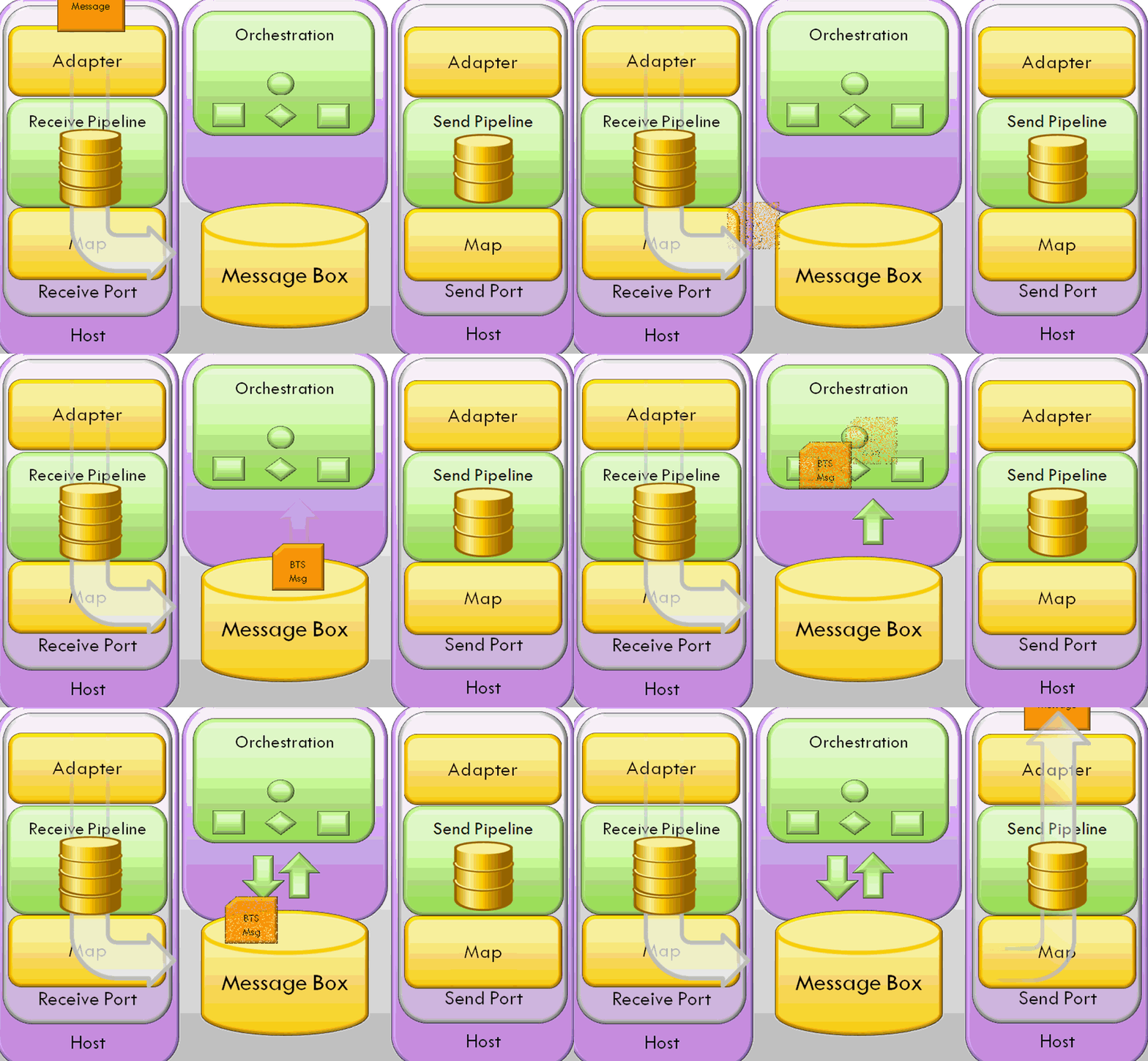
Simply we can say the BizTalk is a Messaging Based Integration Tool and uses XML as the common data exchange language for eCommerce and application integration in the WWW. 

In other words we can say that BizTalk is the main interface in between multiple systems and based on some definitions we can say as "BizTalk Server is Microsoft's central platform for Enterprise Application Integration (EAI) and Business Process Management (BPM) and embodies the integration and automation capabilities of XML and Web Services technologies. BizTalk Server functions as a process execution engine and as a multi-transport hub for messaging and document transformations. It is a Windows Server System product that helps customers efficiently and effectively integrate systems, employees and trading partners".

Biz2009 BizTalk_bt_1

you can understand what is happening inside BizTalk by viewing the following animated jpeg file :

 get_image.php

if you can’t view the animation please do not hesitate to click this link:http://farm3.static.flickr.com/2718/4127256189_0da73842e3_o.gif

Monday, November 09, 2009

Cannot implicitly convert type 'System.DBNull' to 'int'

There will be situations where you have to set null values to an Integer field. So when you tried to assign a DBNull.Value to an integer varialbe you will prompt for the error : "Cannot implicitly convert type 'System.DBNull' to 'int' ".

to resolve this matter, let it be as its in the interface level, but at the time of passing the parameter to the Database just make it DBNull.Value.

'With your command object

1: myCmd.Parameters.Add("@myParameter",SQLDBType.INT).Value = IIf(myTextBox.Text <> "", myTextBox.Text, DBNull.Value)

another code snippet :
  1. if (Employee.EmployeeManagerID == 0) { AddParameter("@EmployeeManagerID", DBNull.Value, DbType.Int32, null, ParameterDirection.Input); } else AddParameter("@Manager",Employee.EmployeeManagerID, DbType.Int32, null, ParameterDirection.Input);

Microsoft JScript runtime error: 'Sys' is undefined

After some time back was working in a Development project and was came across an error :

Microsoft JScript runtime error: 'Sys' is undefined,

as i went on hunting for the solution for this there are so many answers i was able to find. But the error which was triggerd in my application was due to not specifying httphandlers and httpmodules handlers in web.conf file.

I will try to post the code later as for the moment i couldn't post html stuffs in blogger.

Friday, September 25, 2009

Contacts temporarily unavailable in Google Talk and GMAIL

Seems Google having problem loading Contacts in both the Gmail and Google Talk. Googles' response to this problem :

Contacts temporarily unavailable

Your contact list is temporarily unavailable, which may result in a few issues:

  • Auto-complete may not work
  • The contact manager may not load
  • Chat may not work
We're working to fix the problem, and in the meantime, you should be able to continue to read and send mail as normal. Thank you for your patience.